A Content Sync Toolkit for Xperience by Kentico
Table of Contents
I have created a new open-source project for Xperience by Kentico: the Xperience Community Content Sync Toolkit.
Content Sync lets editors push pages and content hub items from one instance to another, for example from staging to production. The toolkit builds on it with an overview of what’s ready to sync: a Sync status application, under Content management, that compares an instance with its Content Sync target.
Getting Started
The latest beta, 1.0.0-beta.2, is available for Xperience by Kentico 30.8.0 and newer. Install it on both instances, the Content Sync source and target:
dotnet add package XperienceCommunity.ContentSyncToolkit --version 1.0.0-beta.2
Register it in Program.cs:
builder.Services.AddContentSyncToolkit();

// On the source instance: adds the Sync status application.
builder.Services.AddContentSyncToolkitAdmin();
There’s nothing else to configure. The toolkit uses Xperience’s own Content Sync settings, so it always compares against the target Content Sync pushes to. Grant View on Sync status to the roles that need it.
What Still Needs Syncing
The application has two tabs, Pages and Content hub. Each one lists the items of a website channel or workspace, in one language, with one status per item. The color says what to do, and the label says what’s different:
- Red, Incompatible: a sync would fail, so a developer has to update the target first.
- Orange, Unpublished, New, Changed, Moved or Reordered: you can sync it, and the label says what the sync would change.
- Grey, Not published or Only on target: a sync can’t change it right now.
- Green, In sync: nothing to do.
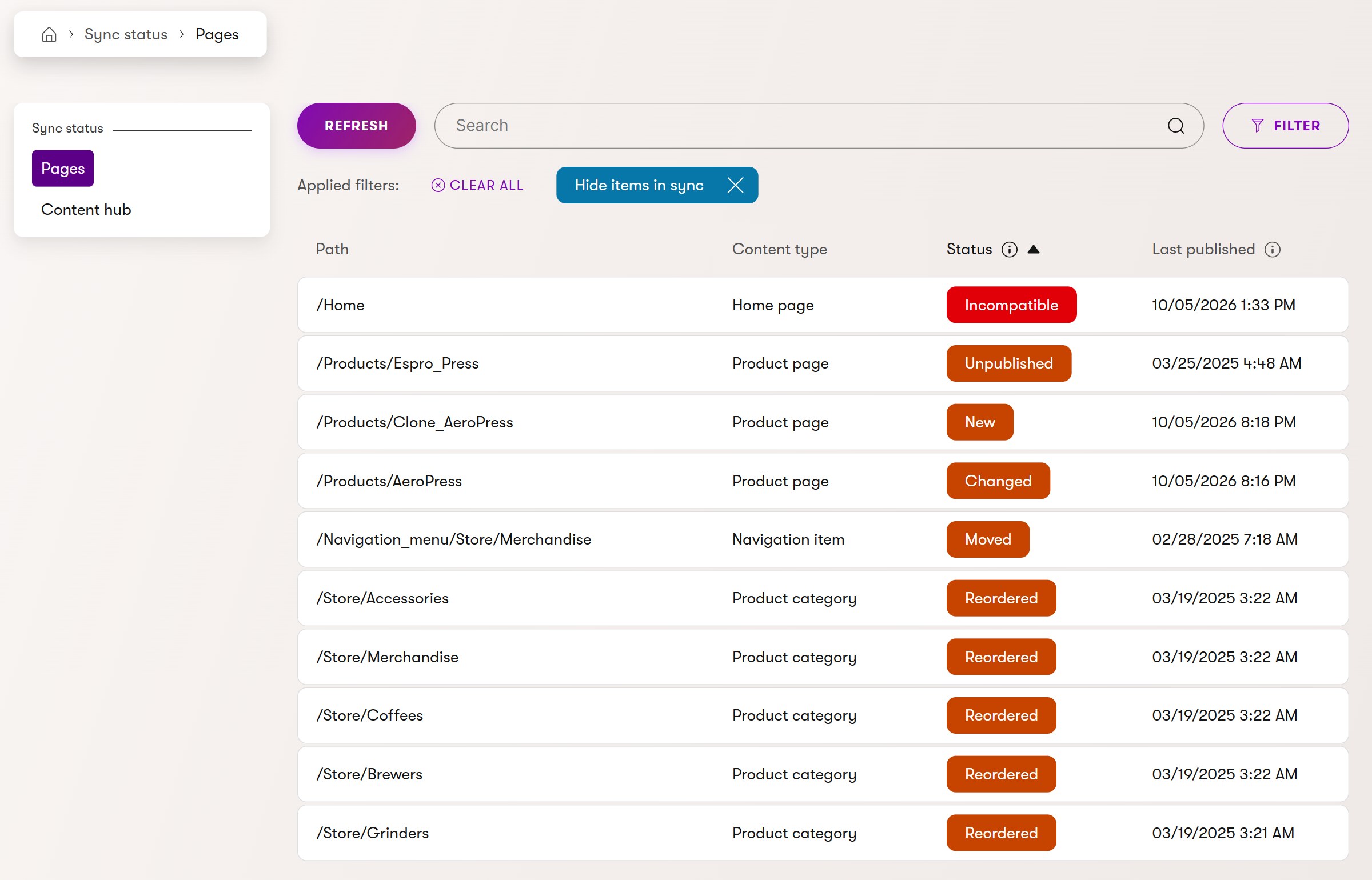
The list starts with what needs attention. Hide items in sync shows only what differs, and the Status filter lets you pick several statuses at once. Each row opens the item in its editor. To sync it, use Kentico’s own actions: Sync this page in the page tree for a page, or Sync in the Content hub list for a content item.
The tooltips explain each case. Content Sync fails for items whose content type, language, channel or workspace doesn’t exist on the target, or exists with different fields. The toolkit checks that before you try, with the same message as Kentico’s own sync dialog:

Moving or reordering pages doesn’t republish them, and Content Sync only transfers a new order when the whole level is synced. If only some pages of a level were synced, the toolkit marks the level, names the page that’s out of place, and says what to sync:

It also tells you when something can’t be synced yet: an item unpublished and then edited again has no published version, and an item edited without publishing keeps its status, because Content Sync only sends the published version.
Editors only see what they can already see in Xperience: the channels and workspaces they can access, and the pages they’re allowed to see in the page tree.
A Community Project
This is a community project maintained by SimpleA and me. It is not an official Kentico product. This is a beta: it compares publish dates, publication state and page positions, not field values, and it hasn’t been tested on a real SaaS environment yet. The project is released under the MIT License, and contributions and feedback are welcome through GitHub issues and pull requests.
Status indicators inside Xperience’s own page tree and Content hub are planned for future versions. For compatibility details and the complete usage guide, visit the Content Sync Toolkit repository.
That’s it for today.
Until the next post!